
Download Stock Image Transformer – AI‑powered stock image generator, free trial, secure web app
Overview
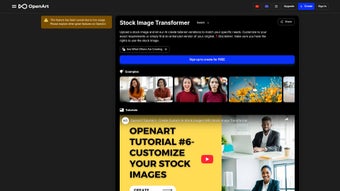
The Stock Image Transformer is a cutting‑edge, web‑based graphics application that leverages advanced artificial intelligence to convert plain‑language prompts into high‑resolution, royalty‑free stock images. Designed for a wide audience that includes freelance designers, large marketing teams, content creators, and developers, the platform removes the time‑consuming and often expensive process of searching traditional stock libraries. By simply typing a description such as “sunset over a futuristic cityscape” or “minimalist flat‑lay of coffee beans”, users receive a uniquely generated visual that aligns with the requested mood, style, and composition. The AI engine handles composition, lighting, and color harmony automatically, while optional sliders let power users fine‑tune creativity levels, aspect ratios, and color palettes. In addition to single‑image generation, the service supports bulk creation, direct download in PNG, JPEG, or WebP formats, and seamless integration with popular design tools via a RESTful API. Security is a core pillar: all data transfers are protected with TLS 1.3 encryption, and the platform complies with GDPR, ensuring that generated assets remain the property of the user. Whether you are racing against a deadline on a freelance gig or scaling visual production for a global brand, Stock Image Transformer provides a fast, reliable, and cost‑effective solution that keeps your creative pipeline flowing.
Key Features
- AI‑driven Text‑to‑Image Generation: Transform natural‑language descriptions into bespoke stock photos within seconds.
- Customizable Creativity Controls: Fine‑tune style, detail, and imagination using intuitive sliders.
- High‑Resolution Output: Export images up to 4K resolution for print‑ready or high‑impact web use.
- Bulk Generation & Download: Create and retrieve multiple images in a single batch, accelerating large projects.
- Multiple Export Formats: Choose PNG, JPEG, or WebP to match any workflow requirement.
- Developer‑friendly API Access: Embed the engine directly into design tools, CMS platforms, or custom applications.
- Secure Cloud Storage: Store generated assets in an encrypted personal library for easy future access.
- Flexible Subscription Model: Free trial, monthly, or annual plans with volume‑based pricing.
- Cross‑Platform Accessibility: Fully web‑based, runs on any modern browser without the need for local installation.
- GDPR‑Compliant Data Handling: Personal data is protected, and ownership of generated images is transferred to the user.
Installation & Compatibility
Because Stock Image Transformer is a cloud‑native solution, there is no traditional installation process. Users simply sign up on the official website, verify their email address, and log into a responsive dashboard that adapts to desktop, tablet, or mobile browsers. The onboarding wizard guides new members through creating their first prompt, selecting desired output settings, and previewing the generated image before final download.
Step‑by‑step usage guide:
- Visit stockimagetransformer.com and click “Start Free Trial”.
- Complete the short registration form; an activation link will be sent to your inbox.
- Log in and navigate to the “Create New Image” panel.
- Enter a clear, descriptive text prompt (e.g., “vibrant tropical beach at sunrise, low‑angle”).
- Select optional parameters: creativity level, aspect ratio (16:9, 1:1, 4:3), and style presets (photographic, illustration, minimal).
- Press “Generate”. The AI processes the request in 5‑15 seconds and displays a preview.
- If needed, use the “Refine” button to tweak the prompt or adjust sliders for higher detail.
- Click “Download” to save the image in your chosen format, or add it to your cloud library for future access.
- For power users, obtain an API key from the “Developer” tab and follow the documentation to embed the service into your own applications.
Compatible Operating Systems: Since the application runs entirely in the browser, it works on any operating system that supports modern web standards—Windows 10/11, macOS Monterey or later, major Linux distributions, Android 8.0+ and iOS 13+. The responsive UI ensures a seamless experience on Chrome, Firefox, Edge, Safari, and mobile browsers such as Chrome for Android and Safari on iPhone. No additional plugins or extensions are required, making it an ideal solution for teams with mixed device ecosystems.
Pros, Cons & Frequently Asked Questions
Pros
- Instant, high‑quality image generation saves time and reduces licensing costs.
- No software download; works on any device with an internet connection.
- Customizable creativity controls cater to both beginners and seasoned designers.
- Bulk generation feature streamlines large‑scale visual projects.
- Secure, GDPR‑compliant storage guarantees ownership of generated assets.
- Transparent subscription pricing with a risk‑free free trial.
Cons
- Requires a stable internet connection; offline use is not possible.
- Advanced customizations may have a learning curve for non‑technical users.
- Higher‑resolution exports are limited to premium subscription tiers.
- AI may occasionally misinterpret ambiguous prompts, necessitating refinement.
- API access is only available on the Business plan, adding cost for developers.
FAQ
Can I use the generated images for commercial projects?
Yes. Once an image is generated, full commercial rights are transferred to the user. You may use the visuals in advertising, branding, print, or digital media without additional royalties.
How does the free trial work?
The free trial grants 20 image generations and access to all standard features for 7 days. No credit card is required; after the trial, you can upgrade to a paid plan or continue with a limited free tier.
Is there a limit on the number of images I can store?
Free users receive 100 MB of cloud storage (approximately 30 high‑resolution images). Paid subscriptions start at 10 GB and scale up based on the selected plan.
Can I integrate Stock Image Transformer with Adobe Photoshop?
Yes. By generating an API key from your account dashboard, you can call the service directly from Photoshop scripts or third‑party plugins that support RESTful APIs.
What security measures protect my data?
All data transmission is encrypted with TLS 1.3. Images are stored in encrypted cloud buckets, and the platform complies with GDPR, giving you full control over data deletion requests.
Stock Image Transformer dramatically cuts down the time I spend searching for perfect visuals. The AI understands my prompts, and the customization sliders let me fine‑tune the output. Highly recommended for any creative workflow.
Conclusion & Call to Action
Stock Image Transformer bridges the gap between imagination and visual reality, offering a fast, secure, and cost‑effective way to generate bespoke stock images without the traditional licensing headaches. Its AI core delivers consistent quality, while the web‑based delivery model ensures you can work from any device, anywhere. Whether you’re a freelance designer expanding your portfolio, a marketing team needing fresh assets for campaigns, or a developer seeking an AI image endpoint, the platform scales to meet those demands.
Download Stock Image Transformer now and unlock unlimited creative potential with a free trial that lets you test every feature risk‑free.



.png)



